Previous
Next
UX/UI
Design Strategy
A. Full picture at a glance
& a quick access to details
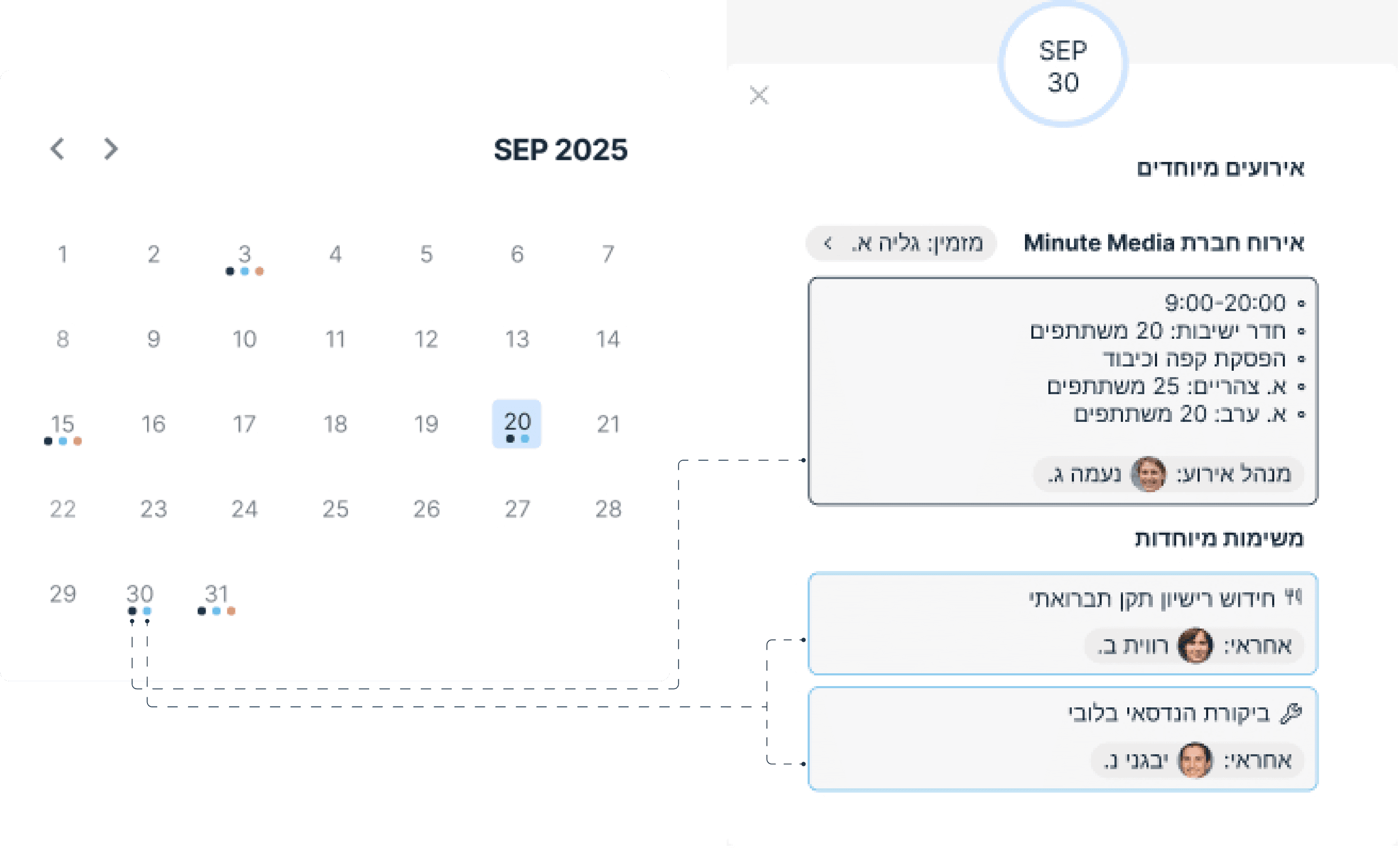
Shift managers require a continuous
high-level status view of all operations, alongside easy access to their personal
tasks and responsibilities.
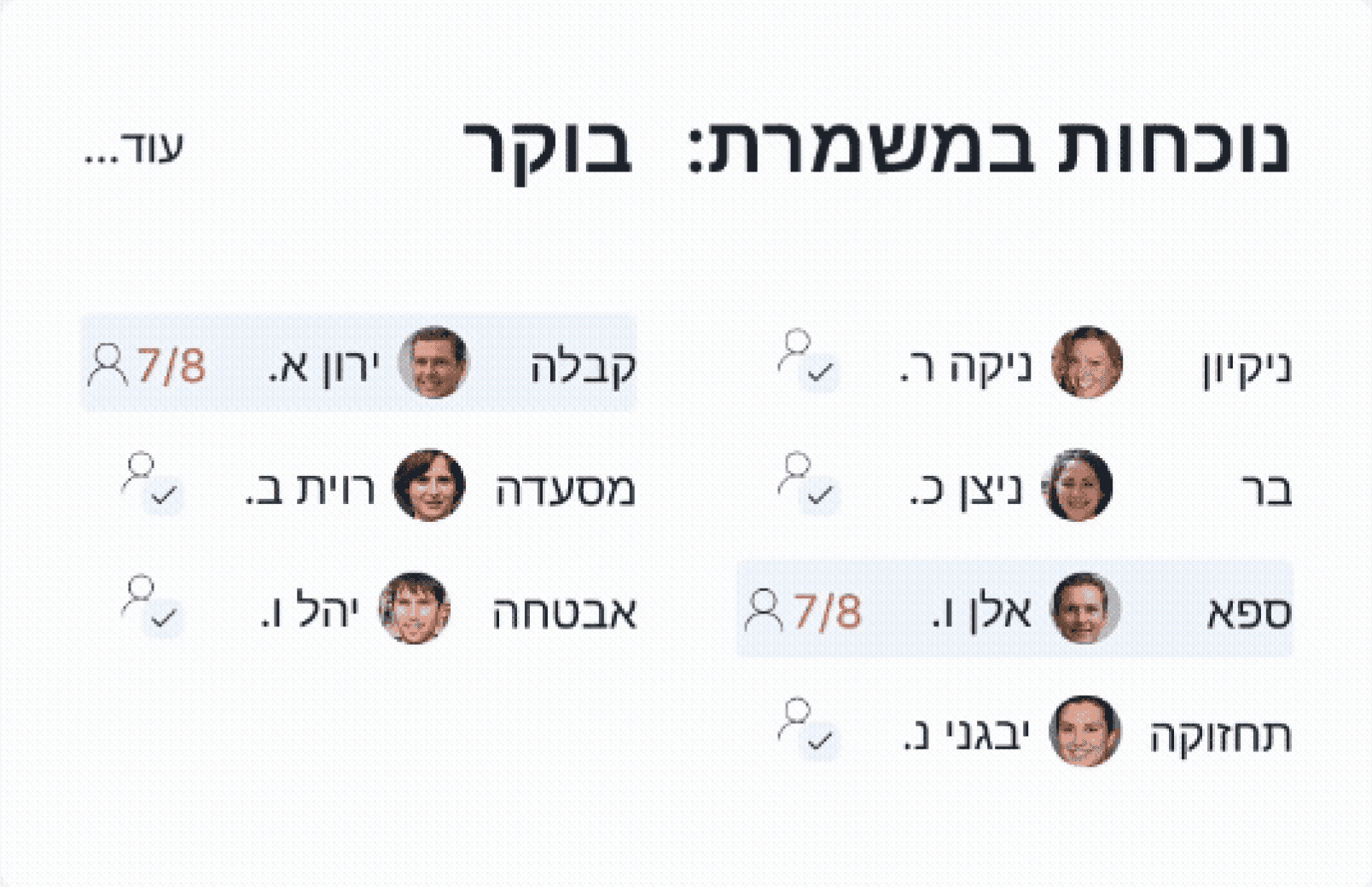
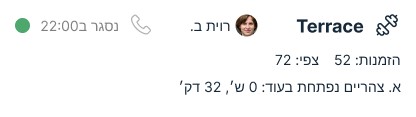
High level information:
Upcoming events
אירועים מיוחדים
מזמין: גליה א.
אירוח חברת Minute Media
9:00-20:00
חדר ישיבות: 20 משתתפים
הפסקת קפה וכיבוד
א. צהריים: 25 משתתפים
א. ערב: 20 משתתפים
נעמה ג.

מנהל אירוע:
משימות מיוחדות
חידוש רישיון תקן תברואתי
רווית ב.
אחראי:
ביקורת הנדסאי בלובי
יבגני נ.

אחראי:
SEP
30
SEP 2025
1
2
3
4
5
6
7
8
9
10
11
12
13
14
15
16
17
18
19
20
21
22
23
24
25
26
27
28
29
30
31
Actionable tasks:
The managers responsibilities and assigned tasks
כל המשימות
זמן הזנה
צוות
שם העובד
SLA
סטטוס
צוות
שמירה
ביטול
B. A non hectic one-stop-shop
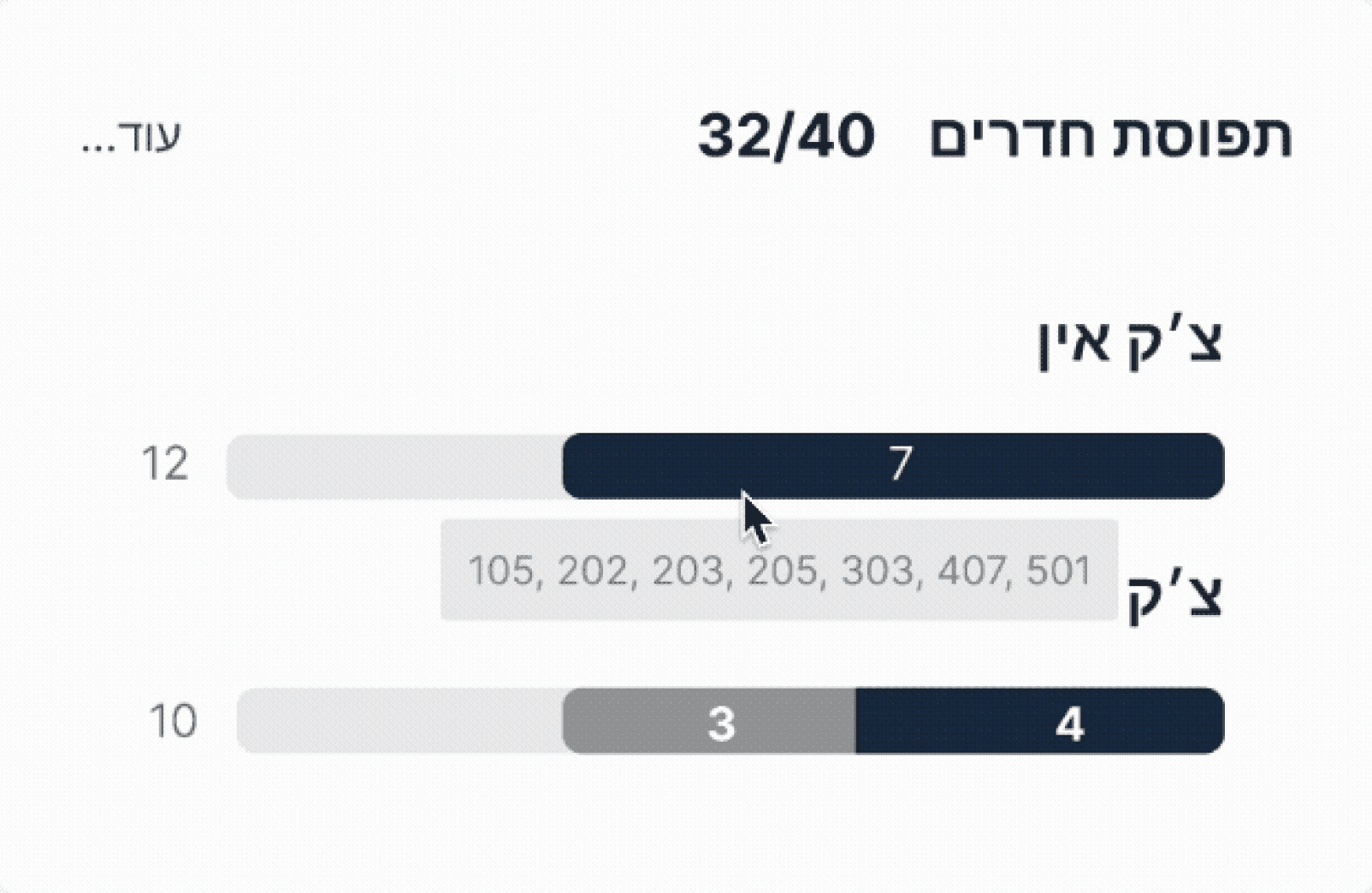
We needed to display a large amount of information without overwhelming the user, so we incorporated hover interactions. This allows information to be layered and revealed gradually, helping managers focus on what matters in the moment.
32/40
תפוסת חדרים
צ׳ק אין
12
7
צ׳ק אאוט
10
3
4
102
103
104
207
408
C. Cross-departmental transparency
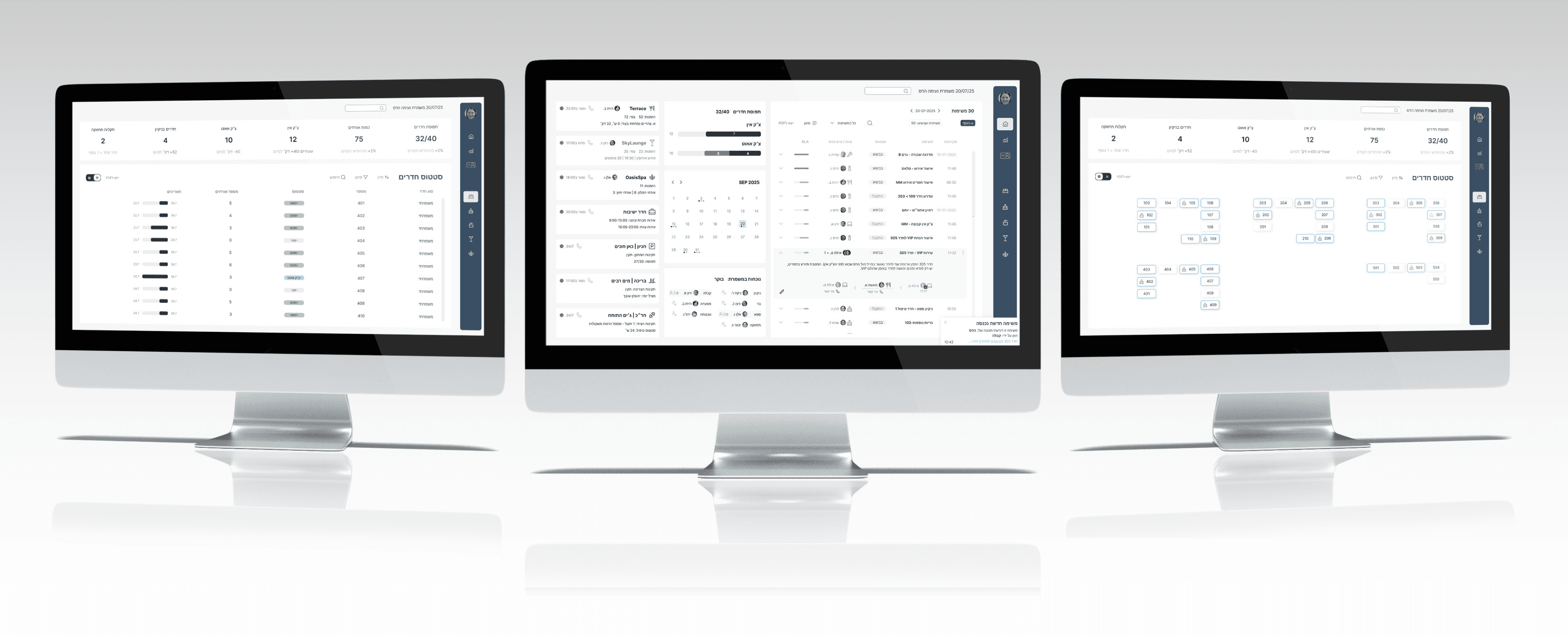
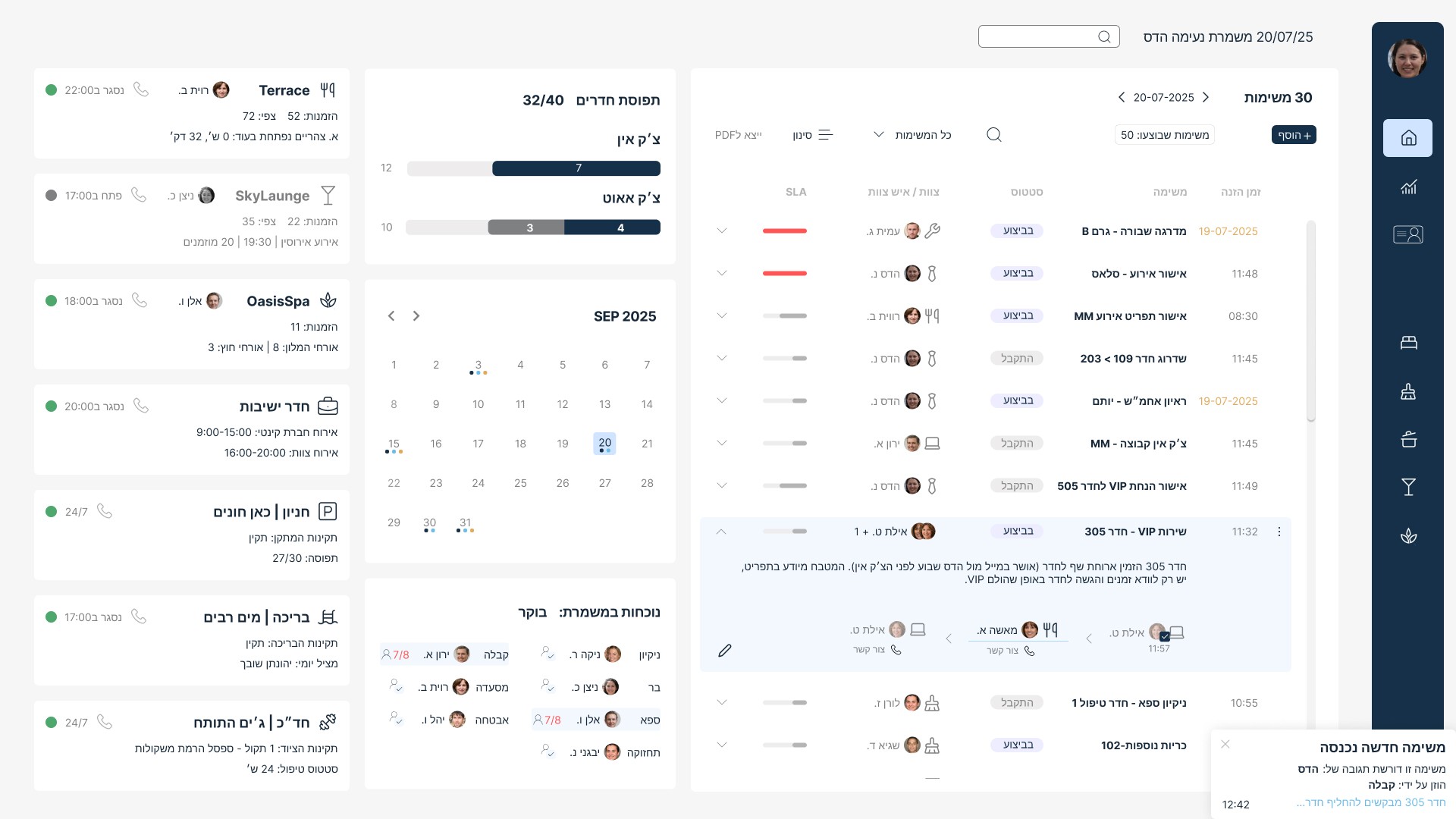
The desktop dashboard acts as the central hub for shift managers. Here, they can monitor all teams and facilities, and team leads can report updates or issues in real time.
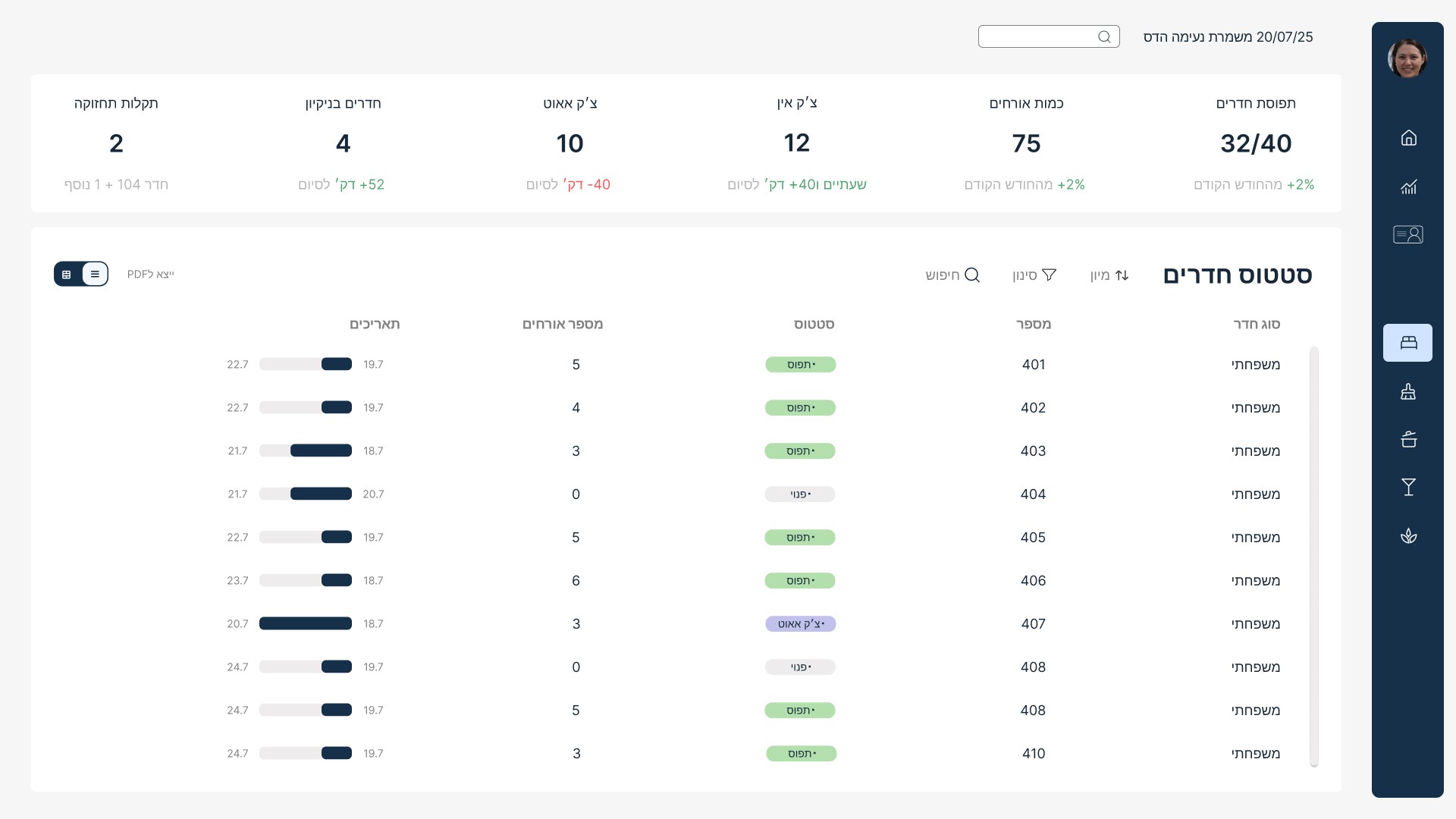
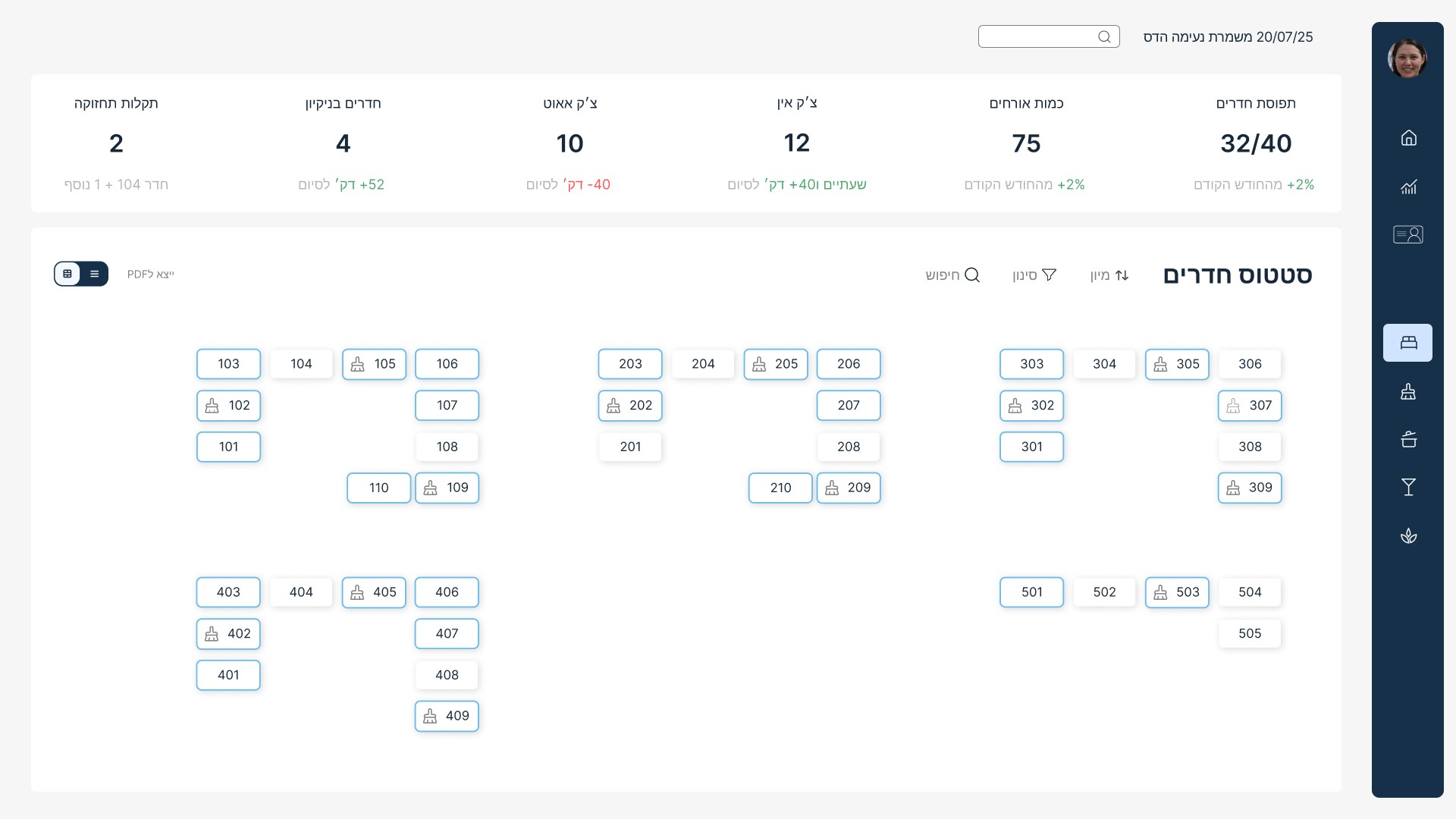
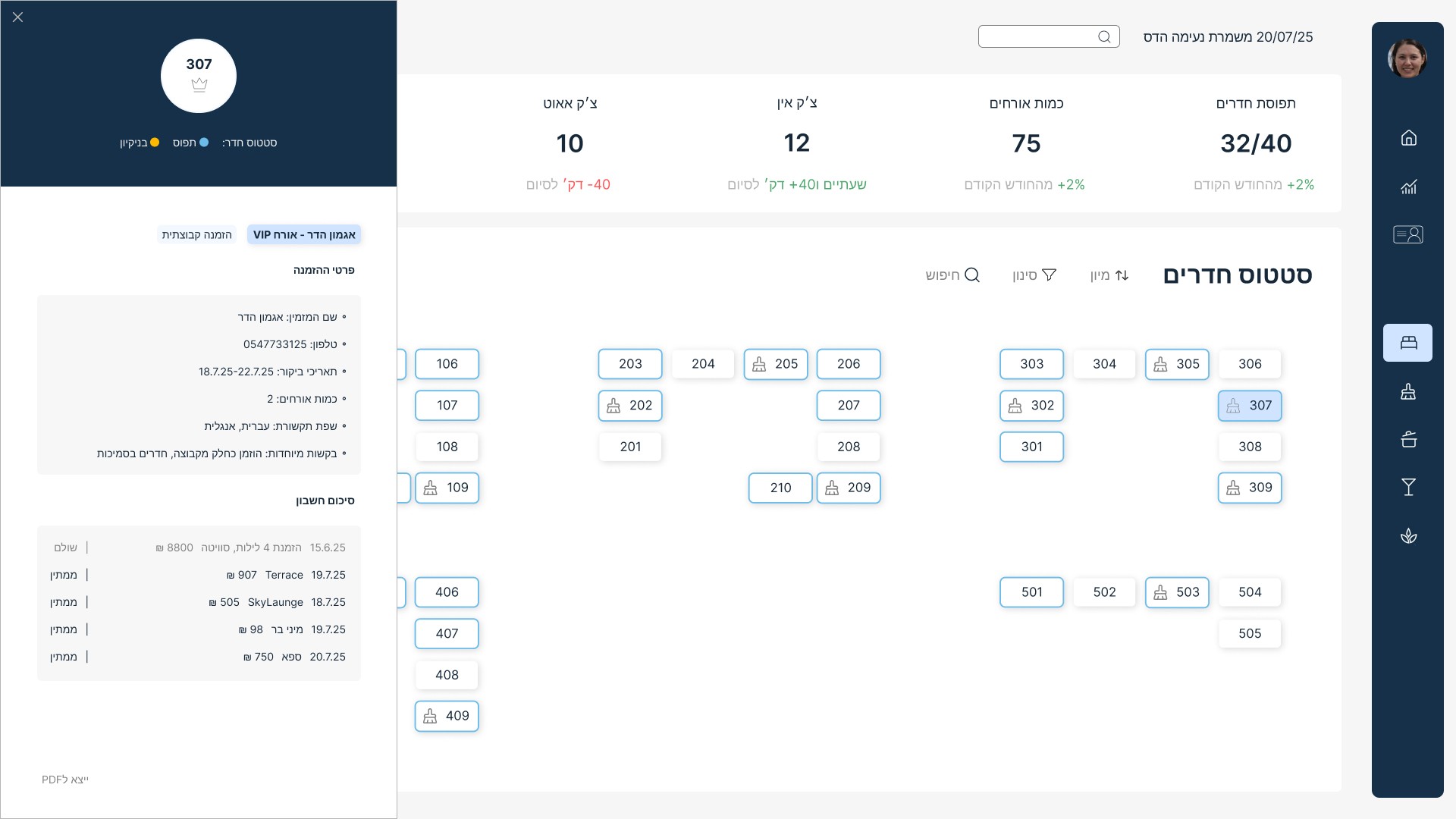
On the contrary, the internal page narrows the focus to one area: room occupancy and guest information. This allows shift managers to drill down into details and take immediate action when needed.
Scroll for
the results
Desktop
Rooms page -
Table view
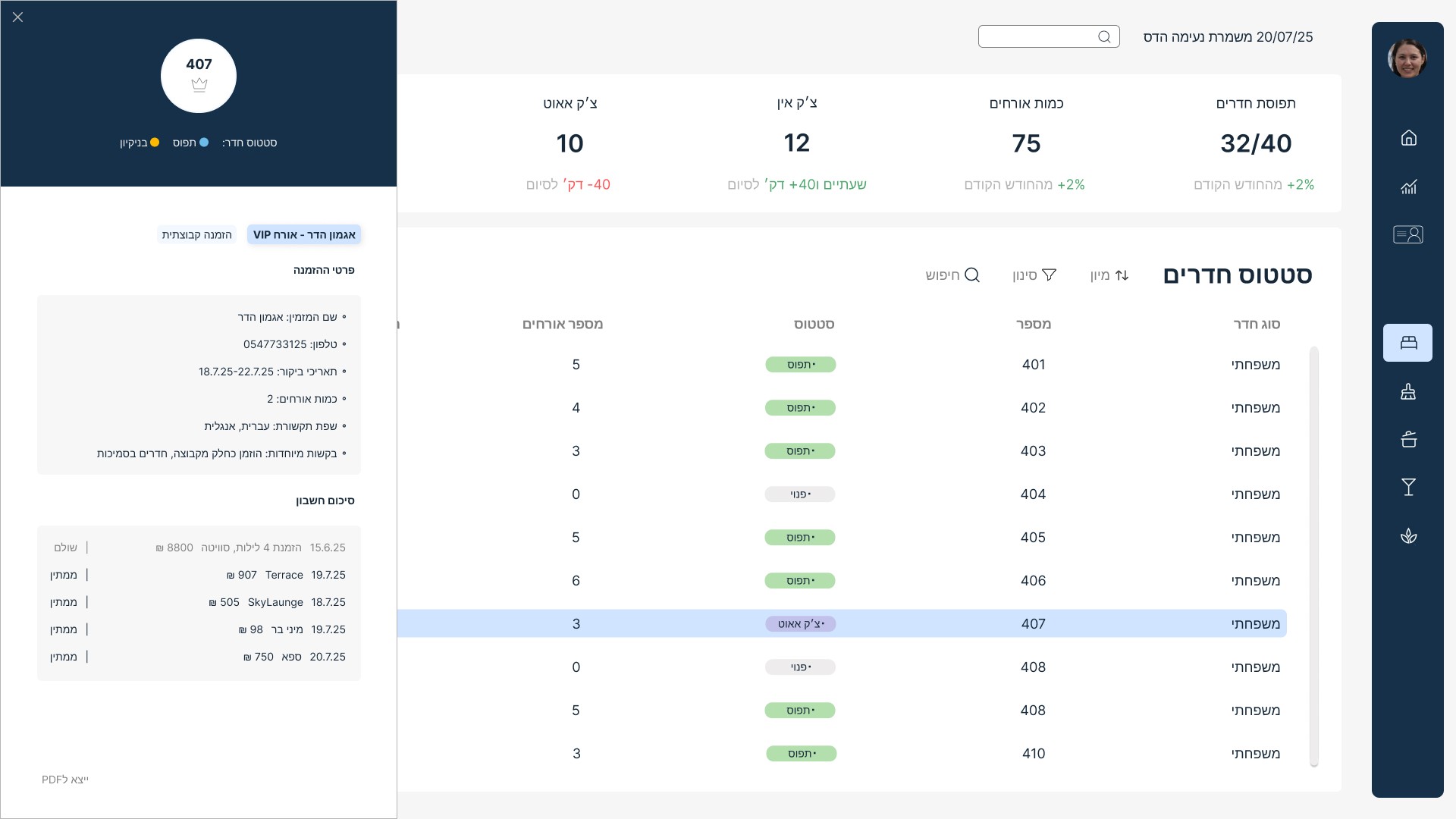
Rooms page -
Table view, s
elected room
Rooms page -
Map view
Rooms page - Map view, selected room
This project was created during my studies at 6B School of Design.
At your service
“At Your Service” is a group project in which we designed a task management platform for Oazis Hotel. Our goal was to create a clear and intuitive dashboard and one internal page, to support the daily work of shift managers and their collaborators.
Design Strategy
Our mission
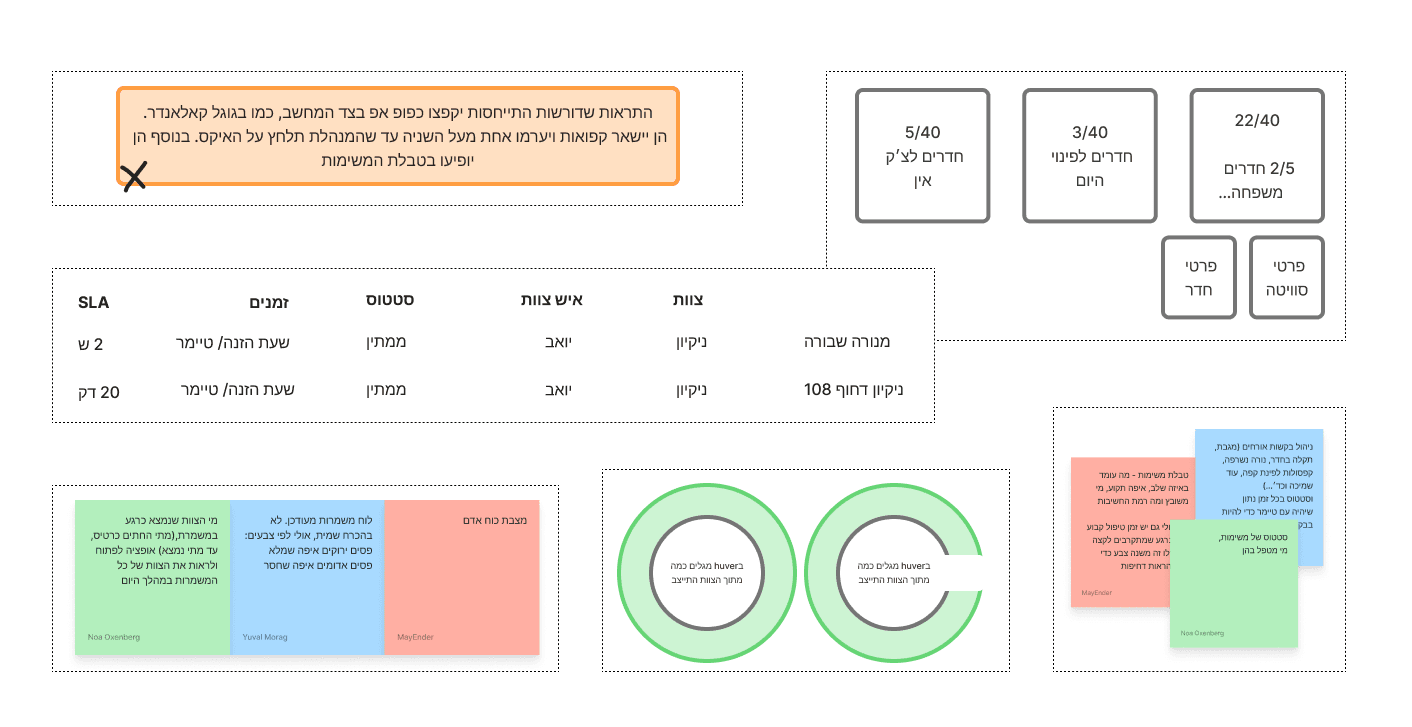
The existing workflow as we imagined it, was fragmented across different tools and communication channels, making it difficult to keep track of priorities.
By mapping daily routines, responsibilities, and the information managers need to access at any given moment, we were able to design a single platform that gives managers a clear overview of the hotel’s operations, along with the ability to assign and monitor tasks easily.
UX/UI
Design Strategy
A. Full picture at a glance
& a quick access to details
Shift managers require a continuous
high-level status view of all operations, alongside easy access to their personal
tasks and responsibilities.
High level information:
Upcoming events
אירועים מיוחדים
מזמין: גליה א.
אירוח חברת Minute Media
9:00-20:00
חדר ישיבות: 20 משתתפים
הפסקת קפה וכיבוד
א. צהריים: 25 משתתפים
א. ערב: 20 משתתפים
נעמה ג.
מנהל אירוע:
משימות מיוחדות
חידוש רישיון תקן תברואתי
רווית ב.
אחראי:
ביקורת הנדסאי בלובי
יבגני נ.
אחראי:
SEP
30
SEP 2025
1
2
3
4
5
6
7
8
9
10
11
12
13
14
15
16
17
18
19
20
21
22
23
24
25
26
27
28
29
30
31
Actionable tasks:
The managers responsibilities and assigned tasks
כל המשימות
זמן הזנה
צוות
שם העובד
SLA
סטטוס
צוות
שמירה
ביטול
B. A non hectic one-stop-shop
We needed to display a large amount of information without overwhelming the user, so we incorporated hover interactions.
This allows information to be layered and revealed gradually, helping managers focus on what matters in the moment.
32/40
תפוסת חדרים
צ׳ק אין
12
7
צ׳ק אאוט
10
3
4
102
103
104
207
408
C. Cross-departmental transparency
The desktop dashboard acts as the central hub for shift managers. Here, they can monitor all teams and facilities, and team leads can report updates or issues in real time.
On the contrary, the internal page narrows the focus to one area: room occupancy and guest information. This allows shift managers to drill down into details and take immediate action when needed.
Scroll for
the results
Desktop
Rooms page -
Table view
Rooms page -
Table view, s
elected room
Rooms page -
Map view
Rooms page - Map view, selected room
This project was created during my studies at 6B School of Design.
At your service
“At Your Service” is a group project in which we designed a task management platform for Oazis Hotel. Our goal was to create a clear and intuitive dashboard and one internal page, to support the daily work of shift managers and their collaborators.
Design Strategy
Our mission
The existing workflow as we imagined it, was fragmented across different tools and communication channels, making it difficult to keep track of priorities.
By mapping daily routines, responsibilities, and the information managers need to access at any given moment, we were able to design a single platform that gives managers a clear overview of the hotel’s operations, along with the ability to assign and monitor tasks easily.
UX/UI
Novia's Lookalike
Candidate Export / Novia101
Lookalike Feature / Novia101
About Novia: Novia is an AI-powered recruitment and talent management platform that helps recruiters and hiring teams evaluate, organize, and move candidates through the hiring process more efficiently.
Context: Novia is an AI-powered recruitment platform that helps recruiters not only find the right candidates, but effectively communicate why they're the right fit. Its goal is to make every candidate recommendation clear, persuasive, and actionable.
Context: Novia is an AI-powered recruitment platform that helps hiring teams find the right candidates faster and with greater accuracy. It reduces manual effort and prevents strong candidates from slipping through the cracks.
The problem
Through conversations with recruiters, we discover a recurring gap in the hiring process.
While job requirements can be documented clearly, many hiring decisions are also influenced by an internal mental model of the "ideal candidate" - built from past successful hires, team dynamics, personality, or other intangible qualities.
Recruiters often know this profile instinctively but struggle to explain it in words.
As a result, there is no way to communicate these implicit preferences to the product. This creates a disconnect between the candidates Novia101 identifies as strong matches based on explicit requirements and the candidates hiring managers feel naturally drawn to. The Lookalike feature explores how this additional layer of hiring intuition can be surfaced and translated into a meaningful product experience.
Novia101's Candidate Export feature launched in 2026, but real customer usage quickly exposed several points of friction.
The initial adoption KPI targeted 35% usage within the first three months, yet the actual adoption rate remained below 20%.
User interviews revealed several recurring issues: exported emails rendered incorrectly in Outlook, the export popup felt cramped and difficult to use, and recruiters had no quick way to share exported candidate summaries via WhatsApp - a channel some hiring managers preferred over email.
Through conversations with recruiters, we discover a recurring gap in the hiring process.
While job requirements can be documented clearly, many hiring decisions are also influenced by an internal mental model of the "ideal candidate" - built from past successful hires, team dynamics, personality, or other intangible qualities.
Recruiters often know this profile instinctively but struggle to explain it in words.
As a result, there is no way to communicate these implicit preferences to the product. This creates a disconnect between the candidates Novia101 identifies as strong matches based on explicit requirements and the candidates hiring managers feel naturally drawn to. The Lookalike feature explores how this additional layer of hiring intuition can be surfaced and translated into a meaningful product experience.
Novia101's Candidate Export feature launched in 2026, but real customer usage quickly exposed several points of friction.
The initial adoption KPI targeted 35% usage within the first three months, yet the actual adoption rate remained below 20%.
User interviews revealed several recurring issues: exported emails rendered incorrectly in Outlook, the export popup felt cramped and difficult to use, and recruiters had no quick way to share exported candidate summaries via WhatsApp - a channel some hiring managers preferred over email.
The overwhelming pop-up:
The Thought Process
The Redesign

The feature planning began as a series of exploration sessions with Novia's AI lead. While she investigates what the LLM can realistically generate, I focus on imagining how the design can be translated into an already exciting Role building process, without adding friction.
Scoping the MVP, we decide to focus t this point on the Explicit Lookalike (manager-driven input), while the Implicit (behavior-inferred) version is deferred to a later phase. Compliance is also considered from the outset, including how the system detects protected-class proxies (e.g., "Female only/Under 35").
Since this was an iteration on a live feature, the redesign was driven directly by user feedback and focused on removing friction quickly, without straying too far from the existing workflow.
Several key improvements were introduced:
Moving the experience from a modal to a dedicated full-screen page.
Supporting both table and paragraph layouts to improve compatibility with different email clients.
Adding one-click copy actions for candidate names or short summaries, making WhatsApp sharing effortless.
While the underlying workflow remained familiar, the interface became significantly clearer and reduced cognitive load. Global settings, per-candidate overrides, and a final preview were separated into distinct steps instead of competing for attention within a single modal.
The feature planning began as a series of exploration sessions with Novia's AI lead. While she investigates what the LLM can realistically generate, I focus on imagining how the design can be translated into an already exciting Role building process, without adding friction.
Scoping the MVP, we decide to focus t this point on the Explicit Lookalike (manager-driven input), while the Implicit (behavior-inferred) version is deferred to a later phase. Compliance is also considered from the outset, including how the system detects protected-class proxies (e.g., "Female only/Under 35").
The Solution
The Impact

The overwhelming pop-up:
The new design:
One core principle: help recruiters externalize an intuitive preference without making the process feel like filling out another form.
To reduce friction, the experience is broken into three lightweight, clearly numbered steps with visible progress and concise guidance throughout.
Step 1 - Define. Users choose the easiest starting point for them: a LinkedIn profile, an existing candidate from the system, or a CV. They can also describe the kind of person they have in mind in free text.
Step 2 – Refine. The LLM generates up to three targeted follow-up questions only when critical information is missing. Once completed (or skipped), it presents an editable summary of the captured persona and translates the extracted signals into structured skill and experience chips that users can review and adjust.
Step 3 – Validate. Instead of asking users to simply "trust the AI," the system generates fictional candidate personas representing different interpretations of their preferences. Users react to these examples, helping refine the profile while building confidence that the system has correctly understood their intent.
The redesigned experience is currently being rolled out, and feedback continues to be collected by the Customer Success team.
Although the evaluation is still ongoing, early adoption has already increased from less than 20% to approximately 27%. At the same time, the redesign is encouraging users who previously abandoned the export flow to give it another try, providing valuable feedback for future iterations.
One core principle: help recruiters externalize an intuitive preference without making the process feel like filling out another form.
To reduce friction, the experience is broken into three lightweight, clearly numbered steps with visible progress and concise guidance throughout.
Step 1 - Define. Users choose the easiest starting point for them: a LinkedIn profile, an existing candidate from the system, or a CV. They can also describe the kind of person they have in mind in free text.
Step 2 – Refine. The LLM generates up to three targeted follow-up questions only when critical information is missing. Once completed (or skipped), it presents an editable summary of the captured persona and translates the extracted signals into structured skill and experience chips that users can review and adjust.
Step 3 – Validate. Instead of asking users to simply "trust the AI," the system generates fictional candidate personas representing different interpretations of their preferences. Users react to these examples, helping refine the profile while building confidence that the system has correctly understood their intent.
The overwhelming pop-up:
The Lookalike builder:
The Impact
As the feature is still in development, its impact is currently evaluated qualitatively rather than through production metrics. The concepts and interaction patterns are validated with the stakeholders who helped define the problem from day one, ensuring the proposed solution aligns with real hiring workflows and business goals.
The expected outcome is to give recruiters a more intuitive way to say "find me more like this," strengthening Novia101's "Fit, don't just match" positioning.
Success will be evaluated after launch using two primary KPIs:
Lookalike adoption - At least 30% of new jobs are expected to use the Lookalike feature within the first three months.
Reduced job requirement revisions – We expect recruiters to make fewer changes to the job requirements after reviewing the first batch of recommended candidates. Indicating that the initial hiring intent captured more accurately, the expectations.
Results
Desktop
Rooms page - Table view
Rooms page - Table view, selected room
Rooms page - Map view
Rooms page - Map view, selected room
This project was created during my studies at 6B School of Design.


The overwhelming pop-up:
The final input as imagined in the early stages:


Results
Desktop
Rooms page - Table view
Rooms page - Table view, selected room
Rooms page - Map view
Rooms page - Map view, selected room
This project was created during my studies at 6B School of Design.
A. Full picture at a glance
& a quick access to details
Shift managers require a continuous high-level status view of all operations, alongside easy access to their personal tasks and responsibilities.
B. A non hectic one-stop-shop
We needed to display a large amount of information without overwhelming the user, so we incorporated hover interactions. This allows information to be layered and revealed gradually, helping managers focus on what matters in the moment.
C. Cross-departmental transparency
The desktop dashboard acts as the central hub for shift managers. Here, they can monitor all teams and facilities, and team leads can report updates or issues in real time.
On the contrary, the internal page narrows the focus to one area: room occupancy and guest information. This allows shift managers to drill down into details and take immediate action when needed.
High level information:
Upcoming events
Actionable tasks:
The managers responsibilities and assigned tasks
כל המשימות
זמן הזנה
צוות
שם העובד
SLA
סטטוס
צוות
שמירה
ביטול
עמית ג.

בביצוע
מדרגה שבורה
19-07-2025
ירון א.

התקבל
צ׳ק אין קבוצה
11:45
אילת ט. + 1


בביצוע
שירות VIP - חדר 305
11:32
חדר 305 הזמין ארוחת שף לחדר (אושר במייל מול הדס שבוע לפני הצ׳ק אין). המטבח מיודע בתפריט,
יש רק לוודא זמנים והגשה לחדר באופן שהולם VIP.
אילת ט.
צור קשר

מאשה א.
צור קשר
אילת ט.
11:57
UX/UI
At your service
“At Your Service” is a group project in which we designed a task management platform for Oazis Hotel. Our goal was to create a clear and intuitive dashboard and one internal page, to support the daily work of shift managers and their collaborators.
“At Your Service” is a group project in which we designed a task management platform for Oazis Hotel. Our goal was to create a clear and intuitive dashboard and one internal page, to support the daily work of shift managers and their collaborators.